Guide
Scrub's API
Call any Tool or Action over HTTP with a key, price it, run it, follow the job and fetch the result.
Every Tool and Action, and each Flow you save, is one call: POST app.scrub.app/v1/tools/<name> with its settings as a JSON body, the same settings as its page, at the same price. The same calls, keys, prices and limits as Scrub over MCP. Each one, with its settings and their defaults, is at https://app.scrub.app/api, and the whole list is at https://app.scrub.app/v1/openapi.json, both open without a key. The API answers with data: a setting left out runs on its default, and nothing asks you a question.
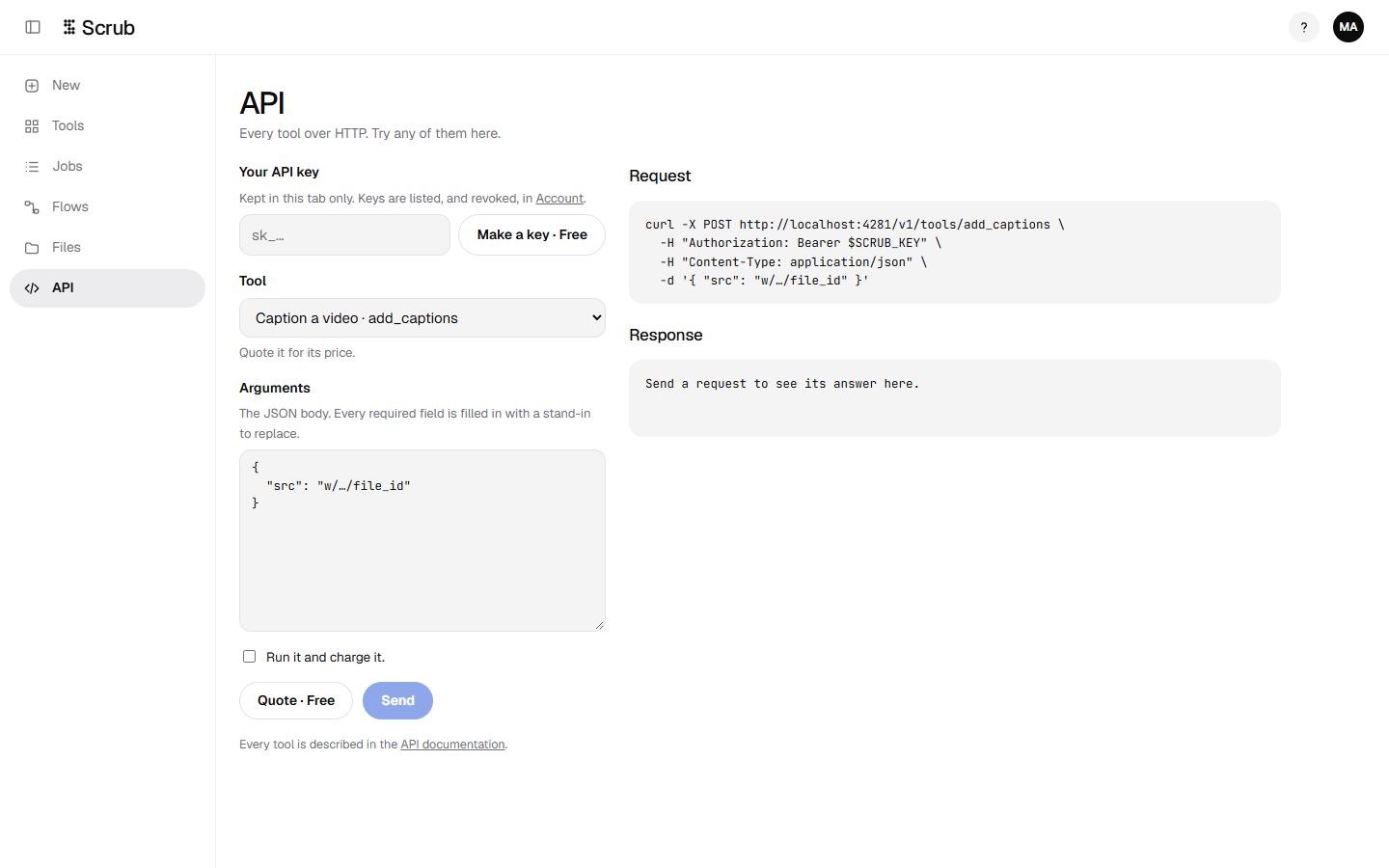
Try it in Scrub. The API page in Scrub runs any call with a key of its own, so you can see what comes back before you write code.
Your key. Issue one in Account and send it with every call as the header Authorization: Bearer sk_…. It works in that workspace and pays from its balance. Revoke it in Account, and its next call is refused.
Price it first. quote prices one call, or several in the order they would run, before anything runs. It is free and writes nothing. Its answer gives each step's price_usd, the total_usd, and whether it fits your spending cap and your balance. - curl -X POST app.scrub.app/v1/tools/quote -H "Authorization: Bearer $SCRUB_KEY" -H "Content-Type: application/json" -d '{"steps": [{"tool": "transcribe_audio", "arguments": {"src": "FILE_ID"} }]}'
Run it. Call the Tool or Action by its name. Work that takes time answers at once with its job_id, status running and its price_usd. A setting you leave out runs on its default. - curl -X POST app.scrub.app/v1/tools/transcribe_audio -H "Authorization: Bearer $SCRUB_KEY" -H "Content-Type: application/json" -H "Idempotency-Key: interview-1" -d '{"src": "FILE_ID"}' - Send the same Idempotency-Key again and you get the same job back, not a second one charged. Without it, every call is a new job.
Follow the job. Ask job_status with the job_id every few seconds. While it is queued or running, it says how much is done (fraction_done) and, where it can tell, about how long is left (seconds_left). It ends as succeeded, failed, refused or cancelled, each answered 200 with what happened and what was charged. - curl -X POST app.scrub.app/v1/tools/job_status -H "Authorization: Bearer $SCRUB_KEY" -H "Content-Type: application/json" -d '{"job_id":"JOB_ID"}' - Once it has succeeded, outputs names each file it made by its file_id, and downloads gives a link to each that works for an hour. The files stay in Files. - stop_job stops a job that is still running, charging only the steps that finished. A run that fails is not charged.
Your files. A Tool or Action takes a file by its file_id. To send one from your code: - Ask create_upload with the file's filename, content_type and size in bytes. It answers with the file_id, an upload_url, and the method and headers to send it with. The link works for an hour, for files up to 4 GB. - curl -X POST app.scrub.app/v1/tools/create_upload -H "Authorization: Bearer $SCRUB_KEY" -H "Content-Type: application/json" -d '{"filename": "interview.mp3", "content_type": "audio/mpeg", "bytes": 18350080}' - Send the file to the upload_url with that method and those headers, such as curl -X PUT -H "Content-Type: audio/mpeg" -T interview.mp3 "UPLOAD_URL". - Ask upload_status with the file_id until uploaded is true, then pass the file_id as the file the work takes. - Instead of a file, a file setting also takes the job_id of a finished job that made a file of that kind. list_files lists your files, and download_file gives a link to one. - An upload no Tool uses goes after a day; with keep set to true it stays in Files as long as your plan keeps files.
In JavaScript. Send each call with fetch: the key in the Authorization header, after Bearer, and the settings as the JSON body. Then ask job_status with result.job_id the same way.
In Python. Send each call with requests.post: the same header, and the settings as json. Then ask job_status with the job_id in the answer's result the same way.
Answers and errors. A call that worked answers 200 with {"ok": true, "result": {…} }. One that could not answers {"ok": false, "error": {"code": "…", "message": "…"} }, the message saying why, with its status:
| Status | Code | When | | --- | --- | --- | | 400 | bad_request | The body is not a JSON object, or is larger than 1 MB. | | 401 | unauthorized | No key was sent, or the key is not valid or was revoked. | | 403 | forbidden | A web page on a site other than Scrub's own sent it. Call from a server or a script. | | 404 | not_found | There is no Tool or Action by that name. | | 405 | method_not_allowed | It was not a POST. | | 422 | refused | Nothing was run or charged: the message says why, such as a setting out of range, a file not in this workspace, the spending cap or the balance. | | 429 | rate_limited | Too many calls this minute. The Retry-After header says how many seconds to wait. | | 503 | | Scrub could not serve it just then, answered with only an error. Send it again. |
Limits. - A workspace makes up to 120 calls a minute, counted across the API, MCP and Scrub's own pages. Asking job_status every five seconds is well inside it. - Every workspace has a spending cap an hour. quote says whether work fits it, and work over it is refused, not charged, until the hour frees enough. - Work runs on the workspace's balance. quote says whether it fits, and credit is added in Account.
Step by step
Your first call on the API
1Issue a key in Account and copy it.
2Price the call with quote on the API page.
3Run Transcribe audio and follow the job.
4See the job in Jobs, with the API as where it came from.
Was this helpful? Tell us