Guide
Connect your AI
The steps Connect your AI on Account shows, for Claude or Claude Code.
Scrub's work can be asked for from any AI that speaks MCP. Connect your AI, on Account, shows the same steps, each with a Copy button.
Claude. Open Claude's form for a custom connector. Open Claude Name it Scrub, paste this address as the MCP server URL and press Continue. https://mcp.scrub.app/mcp Keep what Claude suggests and press Add. Then allow Scrub on the page that opens. On a Team or Enterprise plan, an owner adds it first, in Organization settings, Connectors; then you find Scrub in your connectors and press Connect. Free plans can add one custom connector.
Claude Code. Run this in your terminal. claude mcp add --transport http scrub mcp.scrub.app/mcp In Claude Code, type /mcp, choose scrub, and allow Scrub on the page that opens.
Another AI. Add a connector, sometimes called an MCP server, with this address. https://mcp.scrub.app/mcp Allow Scrub on the page that opens. If it asks for a key instead, issue one in Account and give it as the header Authorization, with Bearer and the key. Issue a key
Claude on your computer and phone. Added once on claude.ai, Scrub is there in Claude's desktop app and on your phone too.
Once it is connected, ask your AI for the work in your own words: "Put captions on Tuesday's interview." It tells you the price and asks before anything is charged. A file too big for your AI's chat goes up through a link it gives you. The work is charged to this workspace, at the same prices as here, and appears in Jobs with the AI that asked for it.
Your Flows too. Every Flow you save is one more tool your AI can run, by its name.
You can disconnect an AI on Account at any time; its next request is refused.
Step by step
Scrub in Claude
1Open Connect your AI on Account and copy the address.
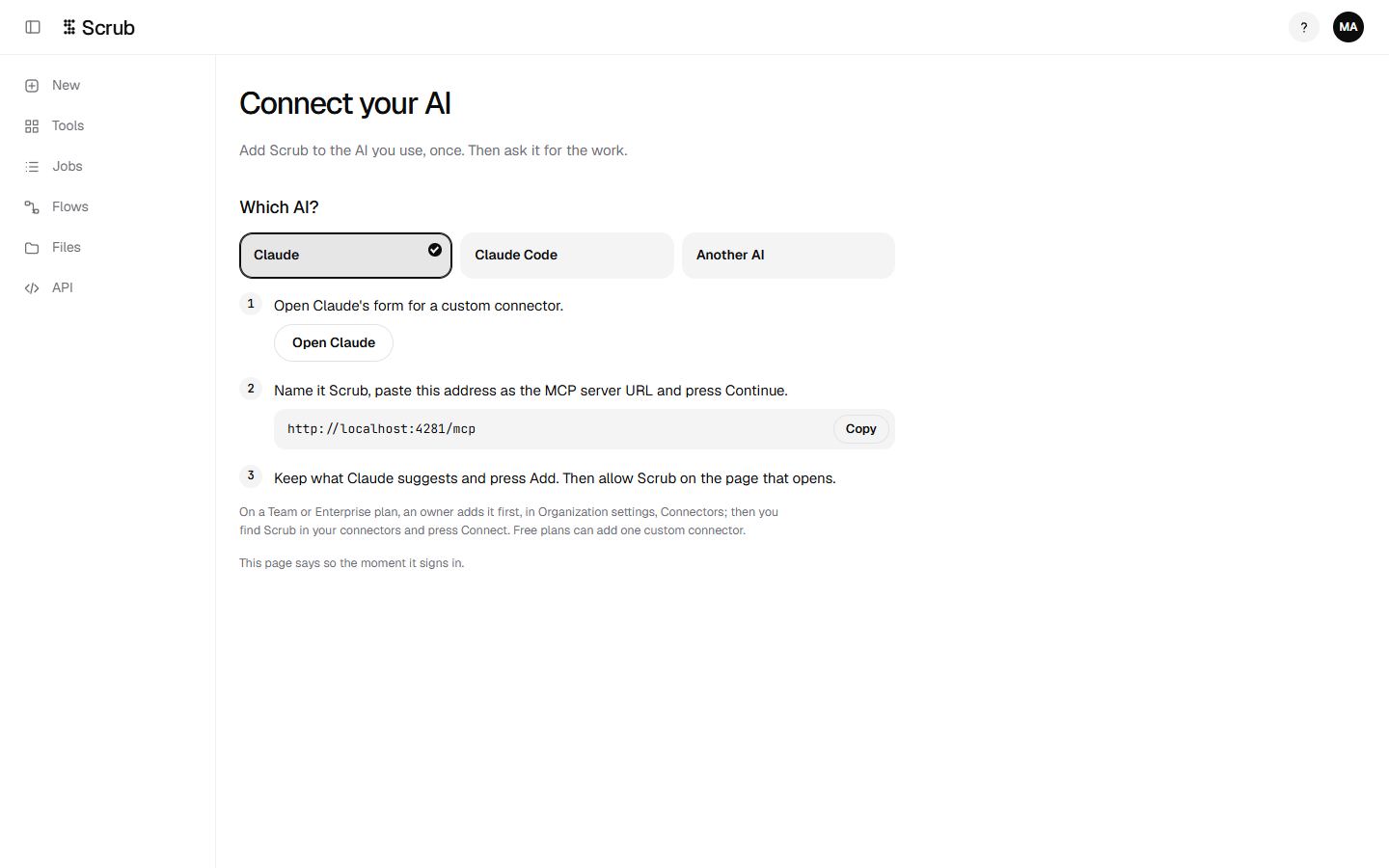
2In Claude, add the custom connector and allow Scrub.
3Ask Claude for the work.
4See the job in Jobs, with Claude as where it came from.
Was this helpful? Tell us